

Overview
In MDF program management, strict timelines govern when partners and channel marketing managers must submit marketing plans and reimbursement claims against allocated funds. When unforeseen delays occur or execution windows need to shift, extension requests allow stakeholders to adjust plan and claim cutoffs without disrupting ongoing co-marketing initiatives.
Through this section, administrators can monitor all requested date adjustments, verifying new deadlines against specific fiscal quarters. The detail view preserves governance and accountability by presenting comprehensive approval records, including designated approvers, action timestamps, and resolution statuses.
Key Features
- Extension Request Tracking
- Submission Deadline Management
- Fiscal Quarter Mapping
- Approval History Auditing
- Custom List Views
- Keyword and Filter Search
Accessing Extension Requests
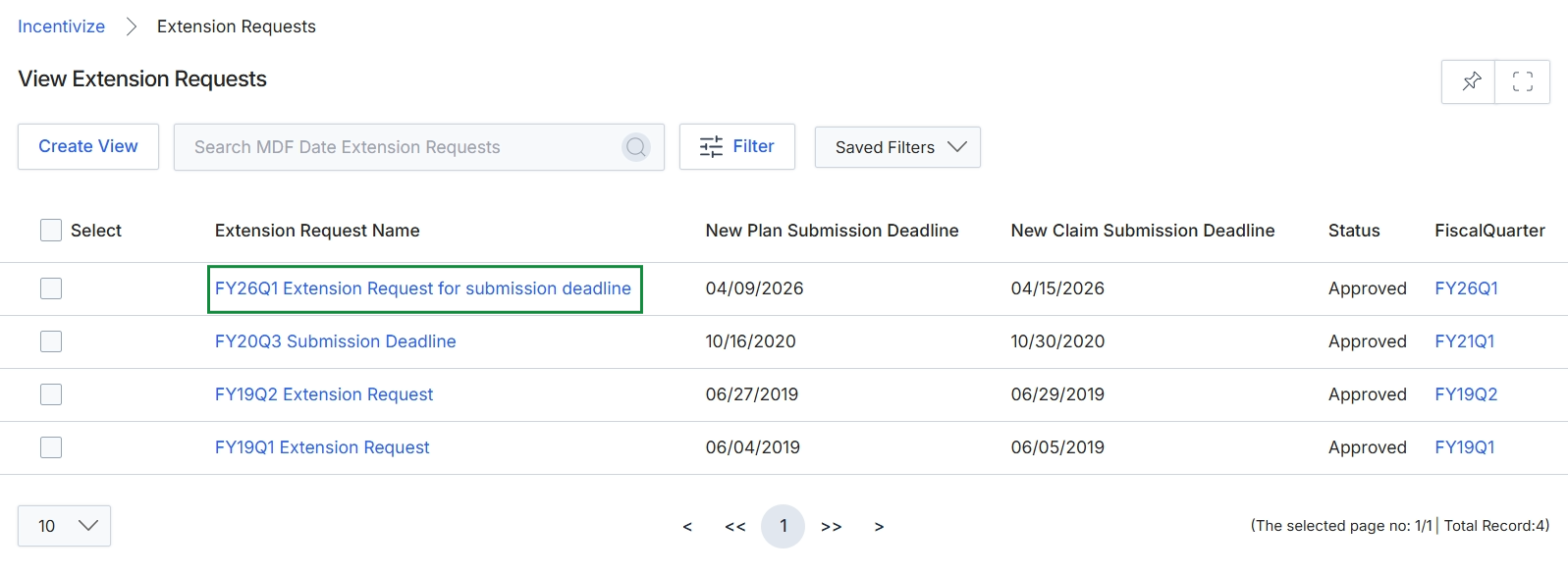
Under the Extension Request Name column, click FY26Q1 Extension Request for submission deadline.
Viewing Extension Details and Approval History
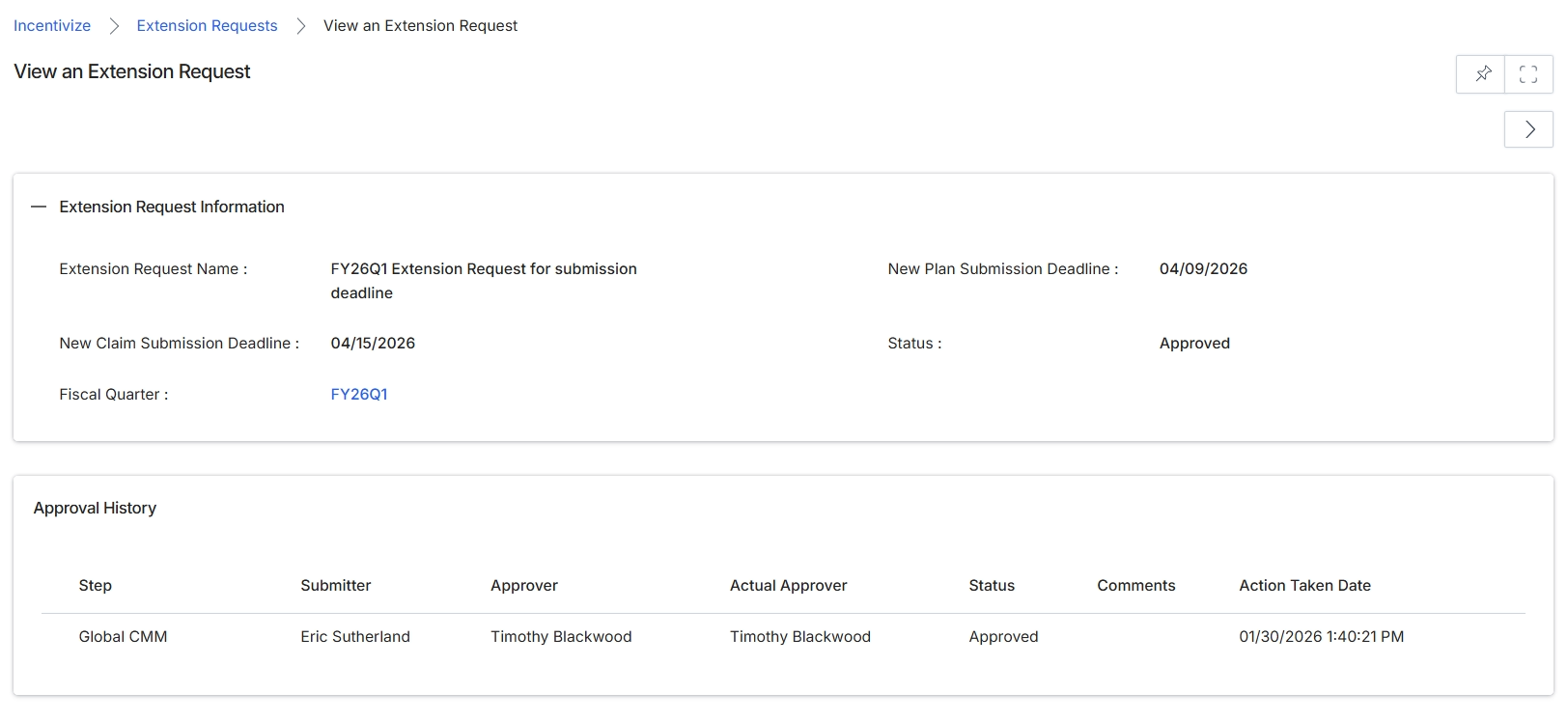
The View an Extension Request screen displays the comprehensive details and audit trail for a partner fund extension request within the Incentivize module. In Market Development Funds (MDF) management, partners must adhere to strict cutoff dates when submitting marketing plans and claiming reimbursement funds. Administrators and channel program managers use this screen to review approved or pending deadline exceptions for a designated fiscal quarter, ensuring visibility into revised plan and claim submission dates. The screen also incorporates an Approval History log that tracks the governance workflow, documenting submitters, designated approvers, actual reviewers, and decision timestamps to maintain compliance.
Review the extension request details and approval history for the specified fiscal quarter.
Extension Request Information
| Field | Description |
|---|---|
| Extension Request Name | Displays the designated title of the extension request. |
| New Plan Submission Deadline | Displays the extended cutoff date for submitting marketing plans for the period. |
| New Claim Submission Deadline | Displays the extended deadline date for submitting fund reimbursement claims. |
| Status | Indicates the current lifecycle state of the extension request. |
| Fiscal Quarter | Displays the associated fiscal quarter link for the extension period. |
Approval History
| Column | Description |
|---|---|
| Step | Lists the workflow approval tier or stage name. |
| Submitter | Identifies the user who submitted the extension request. |
| Approver | Identifies the assigned reviewer for the approval step. |
| Actual Approver | Identifies the user who executed the approval decision. |
| Status | Reflects the approval decision outcome for this workflow step. |
| Comments | Displays reviewer notes or feedback recorded during the approval action. |
| Action Taken Date | Displays the exact date and timestamp when the reviewer completed the action. |
Frequently asked questions
- What is the purpose of viewing an extension request in the MDF module?
It provides a centralized interface for administrators to evaluate requested deadline adjustments for marketing plans and reimbursement claims across designated fiscal periods.
- Which deadline types can be adjusted through an extension request?
An extension request updates the plan submission deadline for marketing initiatives and the claim submission deadline for fund reimbursements.
- What details are captured in the extension request approval history?
The audit trail logs workflow tiers, submitters, designated approvers, actual reviewers, decision outcomes, comments, and action timestamps.
- How do extension requests maintain program governance?
They preserve accountability by mapping all deadline revisions to specific fiscal quarters while documenting every reviewer action and timestamp.